Build a safer keep, improve, consolidate, noindex, or removal-review queue from page-level GSC evidence.
Turn weak performance into a prioritized review list, with evidence before any deletion.
WebTrendSEO’s Content Pruning Recommendation Tool helps you review pages with weak search performance. Connect Search Console temporarily or upload a CSV or ZIP export to build a queue.
Choose a 6, 12, or 16-month lookback and set your click, impression, and position thresholds. Optional filters let you focus on a search type, device, or country. Add a complete URL inventory to identify pages missing from the performance data.
Review the evidence and each page’s purpose before taking action. A page with little search traffic may still support customers, conversions, or essential navigation.

Search Console or CSV input

6, 12, or 16-month lookbacks

Low-click thresholds

Impression thresholds

Position filters

Search type, device, and country

Optional full URL inventory

Keep and improve candidates

Evidence before deletion
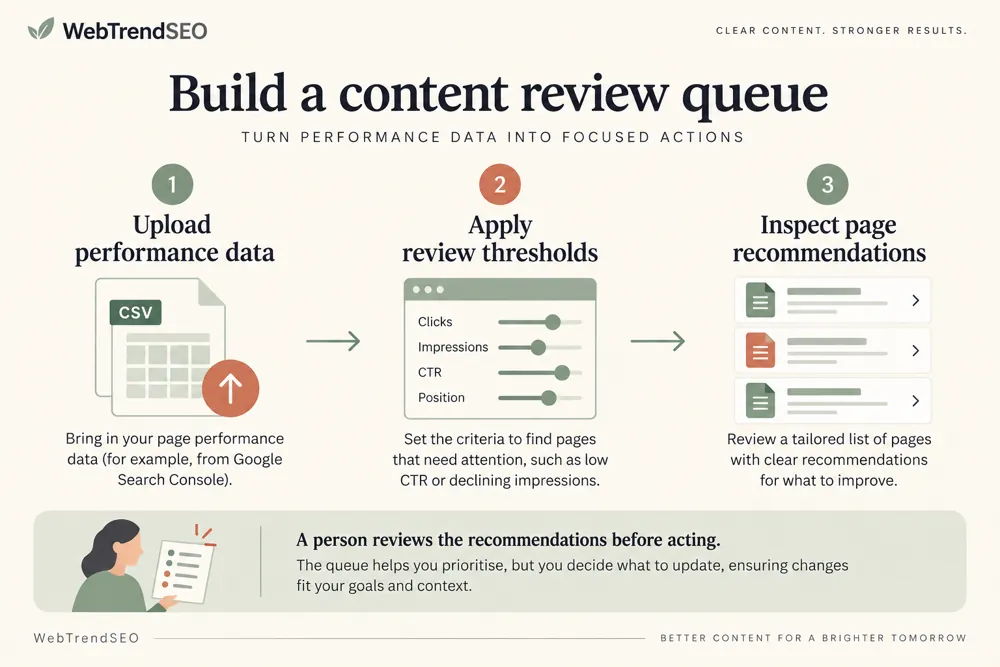
Start with a suitable performance period and thresholds for your site. Treat every recommendation as an invitation to investigate the page’s value.


A long content archive can be difficult to review page by page. Search performance helps you narrow the list, but it should not make the decision for you.
The queue separates improvement opportunities, possible consolidation, utility-page exclusion reviews, and inventory URLs without performance data. Check conversions, backlinks, seasonality, and customer needs before deciding what to change.

Prioritize a large content review

Use your own search performance evidence

Compare pages against consistent thresholds

Separate improvement from consolidation review

Identify inventory URLs with no data

Keep business value in the final decision

Use the queue to plan a focused content audit. Review the evidence for each page and choose a clear action with an owner and a follow-up date.
The tool suits teams reviewing content libraries, old blog posts, or large URL inventories. Set thresholds that fit your site rather than treating defaults as universal rules.


Search Console access is temporary and read-only in your browser. Uploaded files and Search Console tokens are not saved to the WordPress database.
The tool creates recommendations. It does not delete pages, set redirects, add noindex directives, or rewrite content.
Learn how the review queue uses performance data and why recommendations still need a human decision.
It builds a review queue from Search Console performance or uploaded exports. Recommendations help you identify pages to keep and improve, consider for consolidation, or review for intentional exclusion.
No. It does not delete, redirect, noindex, or rewrite pages. Review each page’s purpose and supporting evidence before making any changes.
Connect Search Console temporarily with read-only access, or upload a CSV or ZIP export. You can also add a complete URL inventory to identify pages without performance data.
You can choose 6, 12, or 16 months. Use a period long enough to reflect seasonality and the page’s history, then review recent changes separately.
No. A page may support customers, conversions, navigation, or another channel. Check those roles, backlinks, and seasonality before considering removal.
No. Uploaded files and Search Console tokens are not saved to the WordPress database. Search Console access is temporary and read-only in your browser.
Choose a performance period, build your queue, and review the pages that need attention. Start with improvements you can measure before considering removal.
Feel free get in touch with us via phone or send us a message
phone: +92 3400 644414
email: contact@webtrendseo.com
We use cookies to operate our website, understand how visitors use it and improve our services. You can accept all cookies, reject non-essential cookies or manage your preferences.