Local SEO

Local Landing Page Audit Checker

Audit a public location or service-area page for local relevance, NAP, schema, conversion signals, unique content, and indexability.

Public URLs are fetched through a security-checked, rate-limited WordPress request. Reports are not stored as permanent user records.
Review the local SEO signals on one public landing page and turn the findings into a practical improvement list.

Local Landing Page Audit Checker

Evaluate the Local Signals on a Location Page

WebTrendSEO’s Local Landing Page Audit Checker fetches one public location or service-area page and reviews signals that help users understand what the business offers and where it operates.

Enter the page URL, business name, city or service area, and primary service. Optional target keyword, phone, and address fields help compare the page with the details you expect it to contain.

The report reviews detectable on-page signals and recommends areas to investigate. It does not measure rankings, verify real-world business details, or change the page automatically.

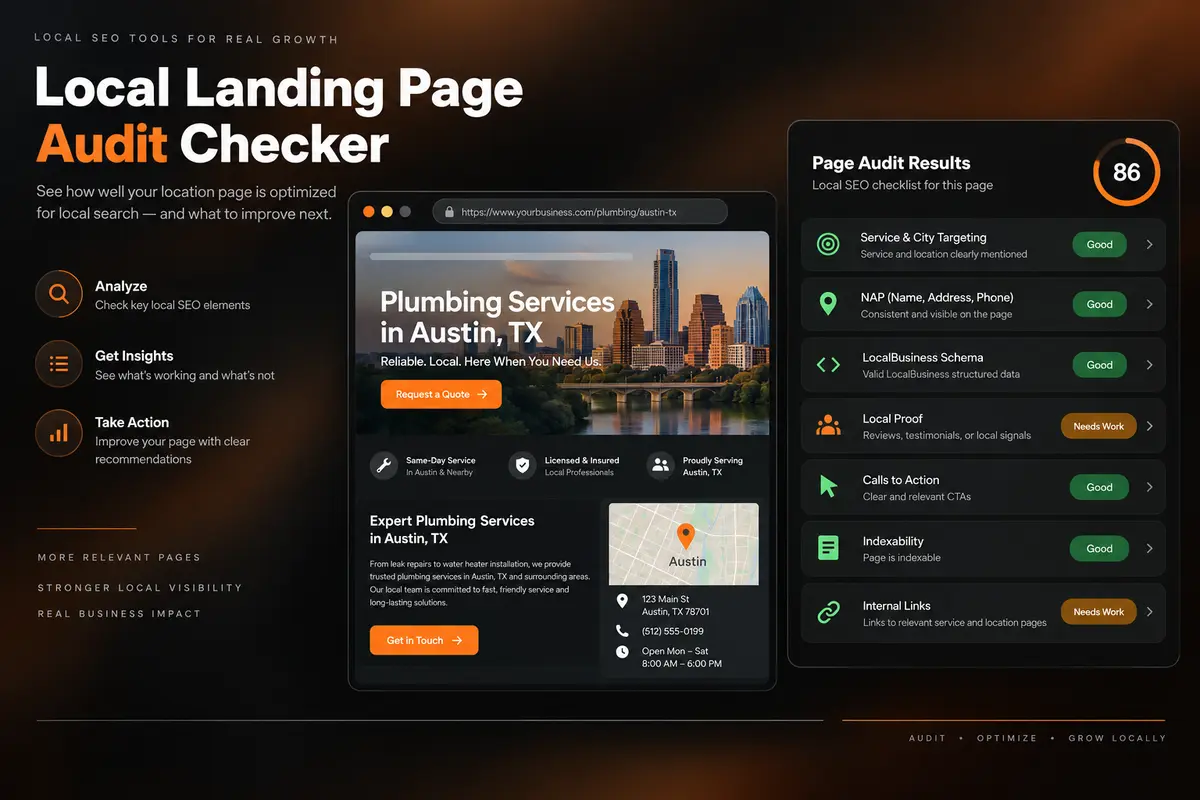
Service and Location Targeting

Review service and location wording

Business Name and NAP Signals

Compare expected business and NAP details

LocalBusiness Schema Review

Review detectable LocalBusiness markup

Unique Local Content

Look for useful page-specific local context

Calls to Action

Check the next step offered to customers

Local Proof Signals

Review detectable local evidence

Indexability Checks

Check technical indexing signals

Internal Link Review

Review page links in context

Prioritized Recommendations

Prioritize findings for manual review

Local landing page audit dashboard reviewing key local SEO signals
HOW IT WORKS

How to Use the Local Landing Page Audit Checker

Provide the page and local business context, then review each finding against the real page and customer experience.
1. Enter the Public URL

Use the exact location or service-area page you want to review.

2. Add Business Context

Enter the business name, city or service area, and primary service.

3. Add Optional Reference Details

Include a target keyword, correct phone, or address when relevant.

4. Run the Audit

Let the tool fetch the public page and evaluate detectable signals.

5. Review Each Finding

Check recommendations against the live page and real business information.

6. Prioritize Useful Changes

Fix clear accuracy, relevance, trust, and conversion gaps first.

WHY USE OUR LOCAL LANDING PAGE AUDIT CHECKER?

Check More Than Keyword Placement

A local page needs to explain its service and location clearly while giving customers useful business and contact information. Reviewing those signals together helps identify gaps.

Check each finding against the page and the real business. Use specific local context and accurate details rather than adding place names repeatedly or making unsupported claims.

Local SEO audit workflow connecting page signals to prioritized actions
Audit One Specific Local Page

Focus on one public page at a time

Check Business Detail Alignment

Compare the page with supplied business details

Review Local Schema Signals

Review detectable local structured data

Find Missing Local Proof

Identify evidence worth investigating

Check Indexability and Links

Check access and navigation signals

Keep Every Edit Under Your Control

Apply only changes you have verified

AUDIT BEFORE YOU PUBLISH

Review Your Location Page as a Complete Experience

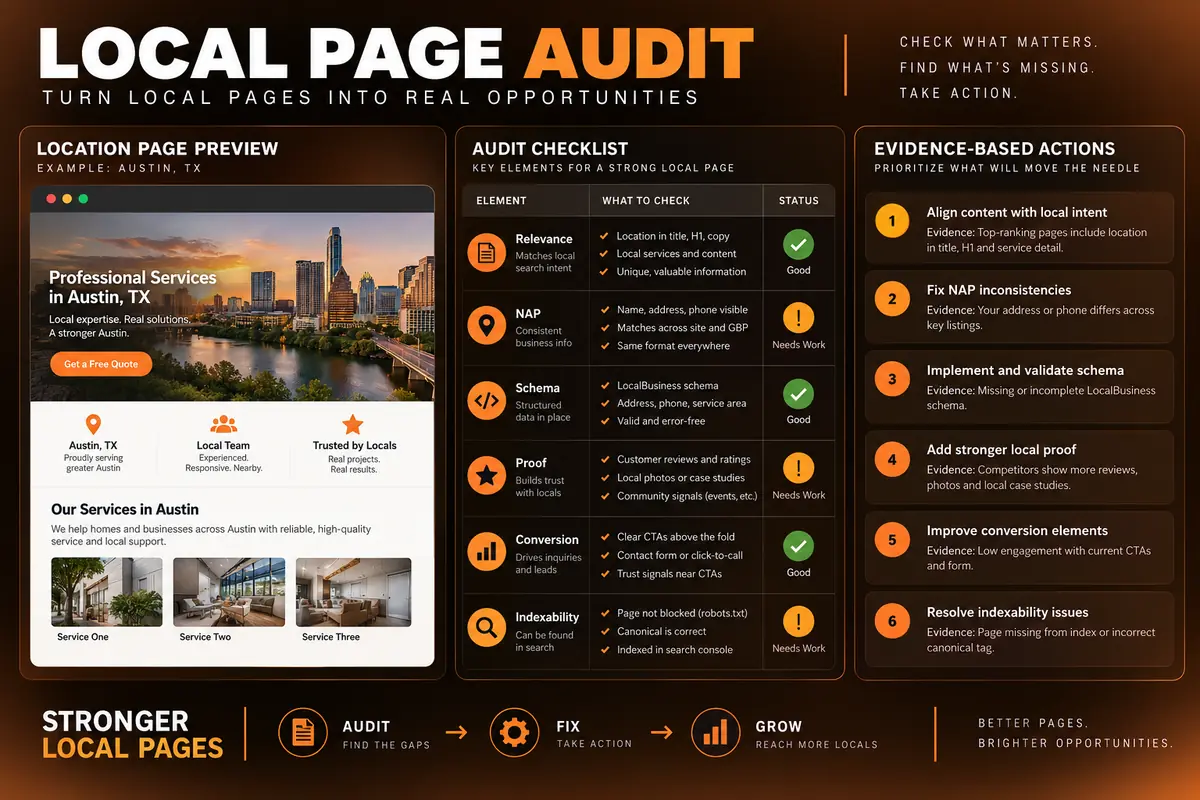
Check whether the page clearly explains the service, location, business details, local proof, and next step before you promote or expand it.
Local page audit checklist with evidence-based improvement actions
USE CASES

Who Can Use This Tool?

Use the checker to review individual city, service-area, branch, clinic, store, office, or franchise pages before publishing or during a local SEO refresh.
Local Business Owners
Multi-Location Companies
Local SEO Consultants
Marketing Agencies
Clinics, Stores, and Offices
Franchise Location Teams
Service-Area Businesses
PUBLIC PAGE ANALYSIS

Audit Only Public, Appropriate URLs

The tool fetches the public URL through a security-checked, rate-limited WordPress request. Its interface states that reports are not stored as permanent user records.

Do not submit private dashboards, staging pages with credentials, or URLs containing sensitive information. The report reflects content and markup the checker can access at the time of the audit.
FREE TOOLS

Other Free Tools From WebTrendSEO

Google Business Profile Audit Checker

Review Google Business Profile details with an audit checklist.

NAP Consistency Checker

Compare name, address, and phone details across supplied records.

Local AI Visibility Checker

Review local brand visibility in supplied AI answers.

Review AI Readability Checker

Review customer feedback for specific details that support clarity.

Page Audit Tool

Review SEO signals on an individual public page.

Schema Markup Generator

Generate structured data markup for supported page types.

Practical SEO tools from WebTrendSEO

FAQS

Local Landing Page Audit Checker FAQs

Learn what the audit checks, which inputs improve the report, and how to use the recommendations responsibly.
It reviews one public location or service-area page for detectable local relevance, business details, schema, conversion signals, unique local proof, indexability, and internal links.
Enter the exact public page URL, business name, city or service area, and primary service. You can also add a target keyword, correct phone number, and address to make specific comparisons more useful.
The tool fetches the public page through a security-checked, rate-limited request, examines accessible content and markup, and applies rule-based checks to the local signals it can detect.
It checks service and location targeting, business name and contact signals, LocalBusiness schema, calls to action, local proof, unique content indicators, indexability, and internal links visible on the audited page.
The tool reviews one accessible page at a time. It does not verify rankings, search volume, backlink strength, Google Business Profile data, citation accuracy, or the real-world truth of business information. Blocked or heavily scripted content may be incomplete.
No. The checker does not edit, publish, redirect, or reindex your page. Review the recommendations and decide which changes accurately serve customers and the business.
LET’S TALK

Turn Local Page Findings Into a Growth Plan

A page audit shows where to investigate. WebTrendSEO can help validate the findings, strengthen local content, improve business signals, and connect location pages with a wider local SEO strategy.